
7 Best Desk Mats for a Stylish, Productive Workspace
Spending hours at a desk means the surface you work on isn’t just a backdrop—it shapes your comfort, productivity, and even the lifespan of your gadgets. A good desk mat cushions your wrists, keeps your mouse gliding smoothly, and protects the tabletop from scratches, spills, and wear. With countless materials, sizes, and designs flooding the market, picking the perfect one can feel overwhelming. That’s why we’ve tested dozens of options and narrowed them down to the seven standout desk mats that combine durability, ergonomics, and style. In the following sections you’ll discover which models earn top marks and why they might be the upgrade your workspace needs.
Must-Have Desk Mats for a Stylish Workspace
We’ve tested countless options, and these seven desk mats stand out for durability, comfort, and sleek design that elevate any workstation.
7. Aothia PU Leather Laptop Desk Pad

Aothia’s Non‑Slip PU Leather Desk Pad is the perfect blend of style and protection for any workspace. Crafted from durable PU leather, it shields your desk from scratches, heat, spills, and everyday wear while adding a sleek, professional look. The generous 23.6” × 13.7” surface comfortably fits a laptop, mouse, and keyboard, and doubles as a smooth writing pad, mouse pad, or blotter. A special suede‑textured underside boosts friction by 70 % compared with ordinary double‑sided leather, keeping the pad firmly in place even during vigorous typing. The water‑resistant material wipes clean with a damp cloth, making it ideal for coffee‑spilled mornings or ink‑heavy projects. Backed by a one‑year warranty, Aothia promises hassle‑free replacements or a full refund if you’re not satisfied—making it a thoughtful gift for yourself or loved ones.
Pros
- All‑in‑one workspace – large enough for laptop, mouse, and keyboard while serving as a writing pad and blotter.
- Non‑slip suede backing – 70 % more friction than standard pads, so it stays put on any desk surface.
- Waterproof & easy to clean – simply wipe with a wet cloth; no staining or lingering odors.
Cons
- The beige color may blend into light‑colored desks, reducing contrast for some users.
- PU leather, while durable, does not have the same natural feel as genuine leather for those who prefer that texture.
6. Logitech Studio Desk Pad

The Logitech Studio Series Desk Mat in sophisticated Mid‑Grey transforms any workspace into a sleek, protected zone. Its generous 11.8 × 27.5 in footprint comfortably houses a keyboard, mouse, and extra accessories while adding a splash of color and texture to your desk. A fine‑weave, soft‑cloth surface delivers a buttery, silent glide for precise mouse control, whether you’re crunching numbers or gaming after hours. The spill‑resistant top repels liquids, so accidental coffee splashes wipe away with a damp cloth. Built to last, the mat’s strong fibers resist wrinkles and shrinkage, and flat‑stitch, anti‑fray edges keep it looking fresh. An anti‑slip natural‑rubber base (latex‑containing) holds the mat firmly in place, and both the surface fabric and inner layer are made from recycled polyester, giving new life to PET bottles. Pair it with Logitech POP Keys or POP Mouse for a coordinated, emoji‑ready setup that lets your personality shine.
Pros
- Spill‑resistant & easy to clean – protects the desk and simplifies maintenance.
- Effortless, silent mouse glide – fine‑weave cloth enhances precision and comfort.
- Eco‑friendly construction – recycled polyester surface and natural‑rubber base.
Cons
- Latex in the anti‑slip base may not suit users with latex sensitivities.
- Fixed size – while large, it may not cover ultra‑wide desks fully.
5. YSAGi LP-31 Desk Protector
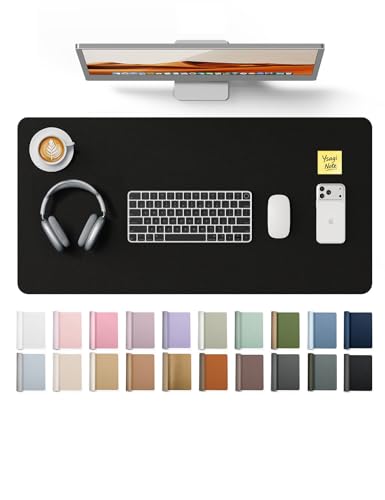
The YSAGi Leather Desk Protector is a versatile, waterproof PU‑leather blotter that turns any workspace into a sleek, protected surface. Measuring 31.5″ × 15.8″, it offers ample room for a laptop, keyboard, and a large mouse pad in one smooth, non‑slip sheet. The durable PU leather shields your desk from scratches, spills, heat, and stains while providing a comfortable writing and typing surface. Its dual‑tone design lets you switch the mood of your office or study with a simple color change, and the suede‑textured backside boosts friction by 70 % compared with ordinary double‑sided leather, keeping the mat firmly in place.
Cleaning is a breeze—just wipe with a dry or slightly damp cloth to remove dust, grease, or liquid spills. Backed by YSAGi’s six‑year experience in premium desk accessories, this mat comes with a one‑year warranty and a hassle‑free replacement or full‑refund guarantee, making it an ideal gift for professionals, students, or home‑office users.
Pros
- All‑in‑one protection & workspace – guards against scratches, heat, and spills while serving as a large mouse pad and writing surface.
- Non‑slip suede backing – 70 % higher friction keeps the mat steady on any desk.
- Easy maintenance – waterproof PU leather wipes clean with a cloth.
Cons
- Limited color options – currently offered only in classic black, which may not suit every décor.
- Thickness may feel firm – some users prefer a softer, cushioned feel under the wrists.
4. GiantDesk Leather Desk Pad

The Large Desk Mat 47.2″ x 17″ blends premium PU leather with a natural cork base, delivering a sleek, protective surface that elevates any workspace. Its reversible design lets you switch between the smooth leather side for a polished look and the textured cork side for extra grip, while the black‑thread stitching adds a touch of sophistication. Waterproof and scratch‑resistant, the mat shields your desk from spills, scratches, and everyday wear, keeping phones, keyboards, and other accessories safe. At 47 × 17 inches, it offers ample room for gaming, design work, writing, or crafting, and the smooth leather surface ensures precise mouse movements. The non‑slip backing keeps the mat firmly in place, and its lightweight, roll‑up construction makes it easy to transport for office, home, or travel use. Packaged in an eco‑friendly blend of cork and leather, it also makes a thoughtful, stylish gift for anyone who values both function and aesthetics.
Pros
- Dual‑material versatility: Choose leather for a refined finish or cork for added grip and stability.
- Robust protection: Waterproof, scratch‑resistant surface safeguards desks and accessories.
- Large, smooth workspace: Ideal for gamers, designers, and writers needing extra room and precise mouse control.
Cons
- Thickness may be noticeable: The cork backing adds a slight raise, which some users might find too firm under a keyboard.
- Limited color options: Currently offered only in classic black, which may not match all décor styles.
3. YSAGi Leather Desk Pad

The YSAGi Leather Desk Pad Protector blends sleek style with practical durability, turning any workspace into a polished, protected zone. Crafted from high‑quality PU leather, the 23.6″ × 13.8″ eggshell‑tone surface shields your desk from scratches, spills, heat, and everyday scuffs while offering a generous, smooth mouse‑tracking area. The soft, suede‑finished backside creates a non‑slip grip that is 70 % more friction‑resistant than standard double‑sided leather pads, keeping the mat firmly in place during intense typing or drawing sessions. Cleaning is a breeze—just wipe with a dry or lightly damp cloth to remove dust, grease, or liquid stains. Whether you’re drafting reports, gaming, or sketching, the expansive surface doubles as a comfortable writing pad, making it a versatile addition for both office and home setups.
Pros
- All‑in‑one protection & workspace: Safeguards the desk while serving as a large mouse pad and writing surface.
- Superior non‑slip stability: Suede backside provides 70 % more friction, preventing unwanted movement.
- Easy maintenance: Waterproof PU leather wipes clean with a simple cloth.
Cons
- PU leather feel: May not have the same natural grain texture as genuine leather for users who prefer that tactile experience.
- Size limitation: While large, the 23.6″ × 13.8″ dimensions might not cover extra‑wide desks fully.
2. Anker Felt Desk Mat 36

The Felt Desk Mat is a sleek, dark‑gray workspace upgrade that blends comfort with durability. Crafted from premium felt cloth, the surface feels buttery soft yet stands up to daily wear, giving your mouse a precise glide without sacrificing speed or control. At 90 cm × 30 cm (36 × 12 in), the mat comfortably fits a laptop, keyboard, and mouse, providing a generous, non‑slipping platform for work, study, or gaming. The natural felt fibers absorb spills and moisture, so a quick brush removes debris and the mat returns to its original state in seconds. Its protective layer shields glass, wood, or plastic desktops from scratches, heat, and abrasions while adding a modern, professional look to any office or home setup. When you need to move, simply roll the flexible mat and take it anywhere—whether it’s a coworking space, a student desk, or a dining table.
Pros
- Ultra‑soft, accurate mouse surface enhances precision and speed for both productivity and play.
- Large, all‑in‑one layout accommodates laptop, keyboard, and mouse, keeping your desk tidy.
- Built‑in protection & easy maintenance guards your tabletop and cleans with a simple brush.
Cons
- Felt may retain a faint imprint from heavy objects if left for extended periods.
- The rollable design, while portable, can feel slightly thinner than a rigid desk pad for users who prefer a firm surface.
1. Aothia Leather Office Desk Pad

Aothia Leather Office Desk Pad Protector combines sleek, professional styling with practical protection for any workspace. Crafted from durable PU leather, this 31.5 × 15.7 in black blotter shields your desk from scratches, heat, spills, and everyday wear while giving the surface a smooth, polished feel that makes writing, typing, and mouse‑tracking a pleasure. The generous dimensions comfortably fit a laptop, keyboard, and mouse, turning the pad into a multifunctional work zone—ideal for both office cubicles and home study areas.
The underside features a special suede‑textured non‑slip backing, delivering about 70 % more friction than standard double‑sided leather so the pad stays firmly in place during intense work sessions. Thanks to its water‑resistant PU construction, accidental spills are easy to wipe away with a damp cloth, keeping your desk looking pristine. A one‑year warranty backs the product, and the company promises a replacement or full refund if you’re not satisfied—making it a risk‑free upgrade for your desk.
Pros
- Robust protection: PU leather guards against scratches, heat, and liquids.
- Large, versatile surface: Fits laptop, keyboard, and mouse; works as a mouse pad, writing pad, and desk mat.
- Secure, non‑slip backing: Suede underside provides 70 % more grip than typical pads.
Cons
- Leather‑like feel: Some users may prefer a softer fabric surface for extended writing.
- Fixed size: The 31.5 × 15.7 in dimensions may be too large for very compact desks.
Buying Guide
When choosing a desk mat, prioritize surface material, size, and functionality to ensure it meets both work and aesthetic needs. A good mat protects your desk, enhances mouse performance, and adds a comfortable workspace.
- Material and texture – choose a surface (cloth, leather, hard plastic) that matches your mouse type and feels comfortable for long typing sessions.
- Size and thickness – ensure the mat covers your keyboard, mouse, and any accessories while providing enough cushion without being too bulky.
- Edge finishing and durability – stitched or beveled edges prevent fraying, and a high‑quality top coat resists spills, scratches, and wear.
- Non‑slip backing and portability – a rubberized underside keeps the mat stable, and a lightweight design lets you roll or fold it for travel.
- Price‑to‑value ratio and reviews – compare features against cost and read user feedback to gauge real‑world performance and longevity.
By weighing material, size, durability, stability, and cost, you can select a desk mat that protects your workspace and boosts productivity. Follow these criteria for a confident purchase.
Frequently Asked Questions
What factors should I consider when choosing the best desk mat?
- Size & Shape: Measure your workspace. Common sizes are 30″x12″ (standard) and 36″x18″ (large). Choose a shape (rectangular, L‑shaped, or custom) that fits your desk layout.
- Material:
- Polyurethane (PU) leather – smooth, easy to clean, good for mouse tracking.
- Hard PVC or polycarbonate – ultra‑durable, resistant to spills, but can feel stiff.
- Fabric‑backed – softer feel, reduces wrist fatigue, but may wear faster.
- Surface Texture: A slightly textured surface improves optical‑mouse accuracy; a smoother surface is better for precision gaming.
- Thickness: 2 mm–4 mm provides a comfortable cushion without wobbling. Thicker mats can protect the desk from heavy equipment.
- Edge Finish: Rounded or beveled edges prevent fraying and are gentler on wrists.
How does a desk mat affect mouse performance?
- Consistency: A uniform surface eliminates the “jagged” feel of uneven desk tops, giving smoother cursor movement.
- Tracking Accuracy: Most modern desk mats are optimized for both optical and laser sensors, reducing jitter and dead zones.
- Speed vs. Precision:
- Smoother mats (e.g., PU leather) allow faster glides, ideal for gaming or rapid navigation.
- Textured mats (e.g., woven fabric) provide more resistance, which can improve fine‑grained control for design work.
- Wear Resistance: High‑quality mats maintain their tracking properties longer, so you won’t need to replace them frequently.
Are there any health benefits to using a desk mat?
- Wrist Support: A cushioned mat adds a thin layer of padding, reducing pressure on the carpal tunnel during prolonged typing or mouse use.
- Reduced Strain: Soft edges and a stable surface keep the forearms at a more ergonomic angle, lowering shoulder and neck tension.
- Desk Protection: By shielding the desk from scratches, spills, and heat, the mat helps maintain a clean, stable work environment, which indirectly contributes to a more comfortable workflow.
- Noise Dampening: Many mats absorb the sound of keyboards and mouse clicks, creating a quieter workspace—beneficial for shared offices or home settings.
Conclusion
Choosing the right desk mat ultimately comes down to balancing comfort, protection, and personal style. A high‑quality surface can soften wrist strain, safeguard your workspace from scratches and spills, and provide a stable base for mouse tracking. Consider the material—whether the smooth glide of cloth, the sleek resilience of leather, or the easy‑clean durability of PVC—alongside dimensions that fit your setup without crowding accessories. Aesthetic choices should complement your décor while reflecting your personality. By weighing durability, ergonomics, and price, you can select a mat that enhances both productivity and the visual appeal of your desk.